How to stop chasing clients for documents every quarter: a 4-step system for accounting firms
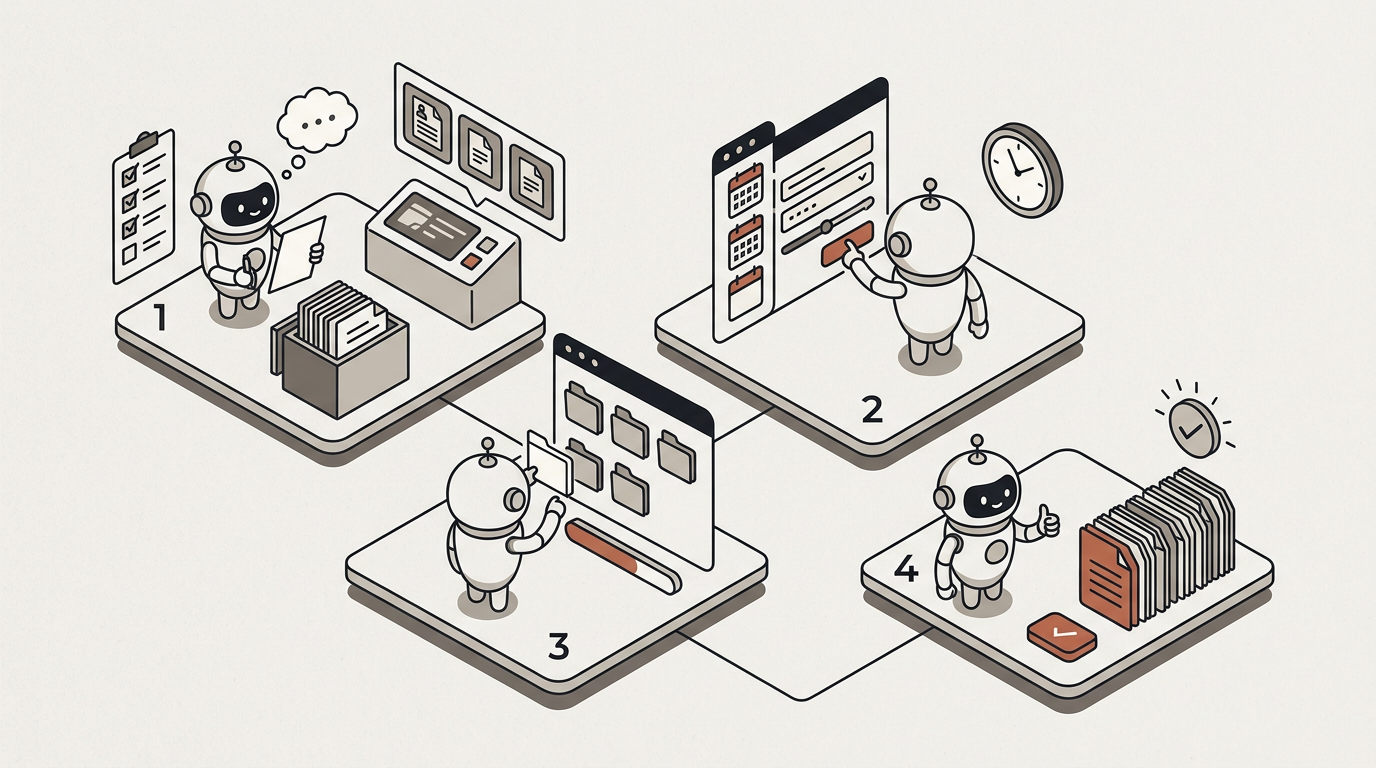
When clients send their documents late, the client is rarely the problem. The request is: it does not say exactly what is missing, gives the client no date of their own, and can be answered in five different places. To automate client document collection — or simply to stop chasing — you first need a four-part system: a checklist per client type, a reminder calendar, one intake channel and a status view. It works in a spreadsheet, and an AI agent can then take on the repetitive part.
The timing matters. Wherever your clients file, quarter-end looks the same; for firms advising clients in Spain, it is happening right now. The third-quarter VAT, withholding and income-tax instalment returns (modelos 303, 111, 115 and 130) are due by 20 October 2026 (opens in new tab). This is not the week to change how your firm works. It is the week to write down what is going wrong, so that January — the fourth quarter plus the annual summaries — goes differently.
Why don't clients send their documents on time?
Because the system we give them makes it hard. Look through your firm's last few document requests and you will probably find at least one of these five failures:
- The request is generic. "Please send us the quarter's paperwork" hands the client the job of working out what that means. A sole trader with three regular suppliers should not have to think about it.
- There is no date of their own. If the client only knows the official deadline, they assume they have until the day before. Your firm needed the documents a week earlier.
- The answer can arrive anywhere. Email, WhatsApp, a photo sent to whoever helped them last time, a link to a shared folder, a bag of receipts at reception. The pieces arrive separately and nobody knows whether the set is complete.
- Every chase is written from scratch. The cadence depends on the week of whoever remembers, and so does the tone.
- Nobody sees the whole picture. Who is late is scattered across personal inboxes, so it is discovered two days before the deadline.
None of these is fixed by asking clients for patience or by chasing harder. They are fixed by redesigning the request, which is what the next four steps do.
Step 1 — One checklist per client type
The rule: every request says exactly what is missing, by name. For that you need one checklist per client type, not one per client; five types cover a good part of most client books.
| Client type | What is usually requested each quarter (summary) |
|---|---|
| Sole trader / self-employed | Sales and purchase invoices, receipts and expense evidence, bank statements, capital asset purchases |
| Limited company | Sales and purchase invoices, statements for every account, loan and lease schedules, new contracts |
| Client with employees | Starters, leavers and changes in the period; invoices from professionals with tax withheld |
| Client with property rentals | Rent invoices, as tenant or as landlord; new or renewed leases |
| Client trading within the EU | Invoices with customers and suppliers in other EU countries, import documentation |
Types combine: a limited company with staff and a rented office gets three blocks. The full checklists, ready to copy, are in the kit at the end of this article.
Two details make the difference. First, name what recurs: if the client pays the same rent every month, the request says "rent invoices for July, August and September", not "expense invoices". Second, the checklist is a starting point: what each client needs is still your firm's call.
Step 2 — A request calendar with reminders tied to the deadline
The client gets one date — yours, which we will call T — even if the tax authority has several. T comes before the official deadline, with time to prepare and review. For clients in Spain, note that paying by direct debit shortens the filing window: for modelos 111, 115 and 130 it closes on 15 October rather than the 20th (AEAT (opens in new tab)).
| When | What goes out | To whom |
|---|---|---|
| Day 1 (period closes) | Request with the checklist for their type | Everyone |
| T−10 | Reminder 1: only what is missing | Clients missing something |
| T−5 | Reminder 2: what is missing, and the date | Clients missing something |
| T−2 | Final notice before the date | Clients missing something |
| T | A phone call from a person | Clients who still have not sent |
| On completion | Confirmation: "we have everything" | The client who has completed |
Four rules make the cadence work rather than annoy:
- Remind only clients who are missing something, and list only what they are missing. A client who has sent half gets the other half by name.
- The confirmation is part of the system. "We have everything" stops the reminders and teaches the client that the checklist has an end.
- The tone gains clarity, not severity. The final notice explains what happens if nothing arrives: a person will call to agree how to proceed. It does not threaten.
- From T onwards, a person talks. Email has done its job.
Using this quarter as an example: if T is Thursday 15 October, the request goes out on the 1st, reminder 1 on Monday the 5th, reminder 2 on Friday the 9th (the 10th is a Saturday) and the final notice on Tuesday the 13th.
In January the full cadence does not fit: the period closes on 31 December and the deadlines arrive within weeks, with the annual summaries on top. That is why a pre-notice in mid-December, asking for October and November documents straight away, pays off. The adjusted January calendar is in the kit.
Step 3 — One intake channel per client
Reminders can go out by email, SMS or WhatsApp. Documents come in through one place, and every reminder says which. Two options work:
- An email address used only for receiving documents, not anybody's personal inbox. The client replies to the request with the attachments, and everything lands where anyone in the firm can see it.
- A client portal under your firm's brand, where the client sees what has been requested and uploads the documents.
Why not WhatsApp? Not because of the channel, but because of where the documents end up: on one person's phone, with no file name and no record of who received it or whether the quarter is complete. If that person goes on holiday, so do the documents. One crooked photo of a receipt at eleven at night is not a problem; twenty clients doing it in the same week is.
When a client sends something by WhatsApp anyway — and they will — don't refuse it: move it into the single channel yourself and reply with the address or link for next time. The aim is to make the right channel the easiest one, not to punish the client.
Step 4 — Review and status: what has arrived, what is missing, who is late
The last step is seeing the whole picture without opening a hundred inboxes. One table per quarter is enough, in whatever tool you already use:
| Client | Type | Requested | Received | Missing | Last reminder | Owner |
|---|---|---|---|---|---|---|
| (example client) | Sole trader + rent | 1 Oct | 4 of 6 | September bank statement; August rent | 9 Oct (T−5) | (name) |
And one habit: check on arrival, not at the end. If documents are checked the day they come in, the T−5 reminder can say "we are missing August's rent invoice" instead of "have you sent everything?". If they are checked two days before the deadline, there is no time left to ask for anything.
With a weekly look at the "missing" column, the owner knows who they will need to call at T before T arrives.
What does an AI agent add to this system?
The four steps work without any new tool. What is hard is keeping them going every quarter with a hundred clients. That is where an AI agent — one that acts, not just converses; we explain the difference in chatbot vs AI agent — changes the load:
- It sends the requests and reminders on schedule, segmented by client type and with each client's missing list, from your firm's own email.
- It captures email attachments automatically. A dedicated email address for the automation captures the attachments, zip files included, and files them in that client's folder.
- It checks what arrived against the checklist and asks the client for what is missing.
- It passes anything uncertain to a person. Whatever is unclear goes to a reviewer's inbox, with the document beside it.
- It answers "what are you still missing?" on the client portal, from that client's own record and never from anyone else's.
- It keeps the status in view: every message and document on the client's timeline, and the Step 4 table generated by the automation itself.
And what it does not do, plainly: it makes no tax decisions and it does not file returns. Tax-authority portals that require a digital certificate — in Spain, the AEAT's, with a certificate or Cl@ve — are outside what an agent can sign in to. In MosenAI, WhatsApp and SMS are outbound: they carry the reminder to the client, but documents come in by email or through the portal.
That is how it works in MosenAI, on the plan that includes automations (pricing). The detail is on document & data processing and client service & accounts, and how it fits a practice's working week on accounting & advisory firms.
What does chasing documents cost your firm?
We are not going to give you a figure: we have no customers to back one, and the one that matters is yours. Fill in this table:
| Item | Your number |
|---|---|
| A. Clients with quarterly obligations | |
| B. Chasing messages per client per quarter (request, reminders, calls, "can you resend that?") | |
| C. Minutes per message, including working out what is missing | |
| D. Hourly cost of whoever does it (€, salary plus employer costs) | |
| Hours per quarter = A × B × C ÷ 60 | |
| Cost per quarter = hours × D | |
| Cost per year = cost per quarter × 4 |
To keep C honest, time ten real chases this week, from the moment someone opens the client's file to the moment the message goes out. The "before" is the part almost every firm skips, and without it there is no way to tell afterwards whether anything worked.
What to do now, mid-quarter
Don't change anything before your clients' current deadline (20 October, for clients in Spain). Do three things that can only be done now, while it is happening:
- Write down why each late client was late: they did not know what to send, did not know the date, sent it through another channel, or did not have it. That is your diagnosis of the five failures.
- Mark the ten clients who took the most chasing. They will be the first to get the checklist for their type.
- Measure C while the chasing is happening, not from memory in November.
With that, you can write the checklists in November and send the pre-notice in mid-December. If you want to see what else an accounting firm can automate, start with our guide to AI for accounting firms. And if you are wondering how e-invoicing will change what clients send you, we cover it in e-invoicing deadlines for accounting firms.
Download the quarterly document-collection kit
Five client document reminder templates and request emails (first request, two reminders, final notice and confirmation), the checklists by client type, a January 2027 calendar for clients in Spain and the cost table. We send it when you subscribe to Hours Back: every two weeks, one process your firm can stop doing by hand.
Frequently asked questions
What documents should we request from a client every quarter?
It depends on the client's type and the returns they file. As a starting point: sales and purchase invoices, expense evidence and bank statements for the period, plus the block for their type (staff changes if they employ people, rent invoices if they rent, EU trade documentation if they trade across borders). The final judgement on each client is your firm's.
How often should we send reminders without becoming a nuisance?
A request, two reminders and a final notice before your date, then a phone call, work well if every message says exactly what is missing and only reaches clients who have something outstanding. What annoys clients is not the frequency; it is a generic reminder after they have already sent everything.
What do we do with clients who keep sending documents through the wrong channel?
Accept them, move them into the single channel yourself and reply with the address or link for next time. If one particular client only works by WhatsApp, make that a known exception assigned to one person, not the firm's norm.
Can an AI agent do the chasing without us losing control?
Yes, if the system is designed that way: the agent sends, collects and checks; anything uncertain goes to a person with the document beside it, and everything it did is on the record. What it does not do is make tax decisions or file returns on a tax-authority portal.
Does it work with clients who are not comfortable with technology?
For most clients, the simplest thing is to reply to the request email with the documents attached, or with legible photos. The portal is better for clients who use it, but it is not required: what matters is that there is one place, not that it is the most modern one.
This article is for information and is not legal or tax advice.